Something is broken
The automation does not do what the documentation says. The form asks for one concrete case, so I can look it up instead of guessing.
- Which case
- Expected
- What happened
- Blocking or not
N8N· CLOUDFLARE· RESEND· NTFY· BUILT FOR MY OWN BUSINESS
This one is mine. Every automation I deliver comes with a private documentation page for the client. What happened after delivery had no page at all: a bug arrived as an email, a change request as a chat message, and a new idea somewhere in the middle of a call. I put a request form inside that documentation and an n8n workflow behind it, so every request lands in one place, complete, with a number on it.
The problem
A client noticing that something is off, or wanting something changed, is a good sign. It means the automation is in use. What costs time is the shape the request arrives in: a line of text, in whichever channel was open, missing exactly the details I need to start.
None of those lines is the work. All of them come before the work can start.
Why it was not a simple job
The obvious answer is helpdesk software, and I looked at it properly. The hosted ones are a monthly bill built for a support team. The open-source ones are a server to run, a database to back up and updates to keep applying, for a handful of requests a month. Most of them also start from a shared mailbox, which is the exact thing I was trying to get out of.
The second constraint is the client. They should not need an account, a new tool or a login they will forget. They already have one place they go for this automation: its documentation, behind a password I gave them. The door had to be there.
And not every request is the same kind of request. A bug, a change and a new idea need different questions asked, and they come with different terms.
The automation does not do what the documentation says. The form asks for one concrete case, so I can look it up instead of guessing.
The automation does what was agreed, and the client now wants it to do something else. The terms for a change are on the form before they send it.
A piece of manual work that is not automated yet. The client does not need to know the solution, only to describe what they do by hand today.
Three kinds of request. Each one gets its own questions, and the client only ever sees the set that fits.
What I built
Concretely: the documentation page gets a second page behind the same password, with the form on it. The client picks one of three kinds of request and answers the questions for that kind. Screenshots can be dragged in, chosen, or pasted straight from the clipboard. A small function on the site checks the submission, stores the screenshots privately and hands the rest to an n8n webhook.
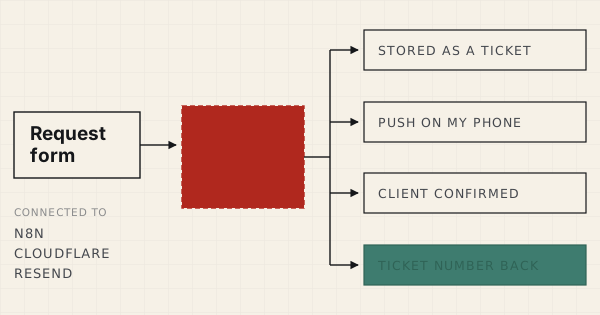
The workflow is six nodes. It writes the request into a table first, and the row it gets back is the ticket number. Then it sends a push notification to my phone, mails the client a confirmation with their own answers in it, and returns the number to the page they are still looking at.
No helpdesk, no extra server, no new account for anybody. It runs on the n8n and the website I already had.
The form on the left never talks to n8n directly. Everything on the right starts from one stored row.
The part I care about most
A blank "describe your problem" box produces exactly the message I was already getting by email. The value is not in having a form. It is in which questions the form asks, and in asking them at the moment the client still has the screen in front of them.
So a bug report asks which customer or invoice it is about, what should have happened, what happened instead, how often, and whether it is blocking anything right now. A change request asks how it works today and how it should work. A request for something new asks for the manual steps, not for a solution. Each question is one I used to send back as a reply.
The same moment is where the terms belong. A change and a new automation are paid work, and the form says so next to the choice, before anything is sent. Nobody finds out afterwards what kind of request they made.
Where this one bites back
I wanted to know about a new ticket without it arriving as one more email. A push notification does that: it reaches me wherever I am, and it never joins the pile in my inbox. But a push is also the one message that shows up on a lock screen, in a meeting, next to whoever happens to be sitting beside me.
So the push carries the ticket number, which client, which kind of request and whether it is blocking something. It carries nothing the client wrote. The content stays in the table and the screenshots stay behind the documentation password, and tapping the notification takes me there.
A notification is a doorbell, not a letter. It should tell you somebody is at the door, and nothing about what they came to say.
The detail nobody notices until it is missing
The order of the six nodes is the design. The request is written to the table before anything else happens, because that row is the one thing that must not be lost. Only then does the workflow push and mail.
Both of those are set to carry on if they fail. If the push service is down or the mail provider hiccups, the ticket still exists and the client still gets their number on screen. A notification I missed is something I find the next time I open the table. A request that was never stored is a client who thinks I am working on it.
Store first, announce second. The announcement is allowed to break. The record is not.
What changed
Which case, what was expected, what happened, how urgent, and the screenshots. The questions are asked once, on the form, and not across three replies.
Every client, every request, one status each. Not a thread in one inbox and a message in another app that I have to remember exists.
A ticket number on screen straight away and a confirmation in their inbox with what they wrote. They do not have to wonder whether I saw it.
Why this one is on the page
Most case studies stop at the moment the thing goes live. The business it runs in keeps changing after that: a price moves, a tool gets replaced, a new kind of customer shows up. What matters then is how easy it is for the client to say so, and how little gets lost on the way to me.
This is also a small build, and that is the point. Six nodes and a form, on tools I already ran. I did not need a helpdesk. I needed the right questions asked in the right place, and one table to put the answers in.
No helpdesk subscription and no extra server to maintain. And the first reply to a request is no longer a question.
If the answer is "wherever they happened to send them", every request starts with you asking for the details it should have arrived with. Book a free audit call and I will map it with you.
Get your free audit call →